PPF to SF2 Conversion — Key Features
YExtractor Pro is the definitive solution for extracting and transforming Yamaha expansion packs. Convert your PPF files directly to professional SF2 format with full control over sampling parameters, envelopes, and voice optimization - no third-party converters needed!
Enterprise-Grade Performance in Under 400 KB
Built on robust .NET Framework architecture, YExtractor Pro delivers professional-grade extraction capabilities in an exceptionally compact, standalone executable.
No external dependencies, no bloated libraries, just pure, optimized code engineered for maximum efficiency and reliability.
Continuous Development & Enhancement
We are actively developing new releases to expand SF2 parameter support and implement additional native SF2 features.
Future updates will bring even more advanced control over soundfont generation, ensuring YExtractor Pro remains at the forefront of PPF to SF2 conversion technology.
Compatibility: WAV/AIFF/SF2 extraction works with user-created PPF files. Yamaha-created PPF files are protected and not supported. PPI files support extraction of voice configurations (VCE/MIDI settings) but not audio waveforms.
-
User-Created PPF Extraction
Extract complete audio content from PPF files created with Expansion Manager and convert to WAV, AIFF or SF2 formats.
-
Direct SF2 Conversion with Advanced Parameters (PPF)
Generate professional SF2 soundfonts directly from PPF files with full control over sampling frequency, scale tuning, ADSR envelopes (including DrumKits), velocity layers, loop points, key ranges, and global Reverb & Chorus Depth parameters. Automatic optimization for melodic voices and drum kits. Batch processing support for exporting multiple SF2 files at once. Compatible with all major DAWs and hardware samplers.
-
Intelligent Voice Scanner (PPF)
Automatically detects and processes complete instruments from PPF files with all samples. Preserves metadata, loop points and more embedded information.
-
FastScan Preview (PPF & PPI)
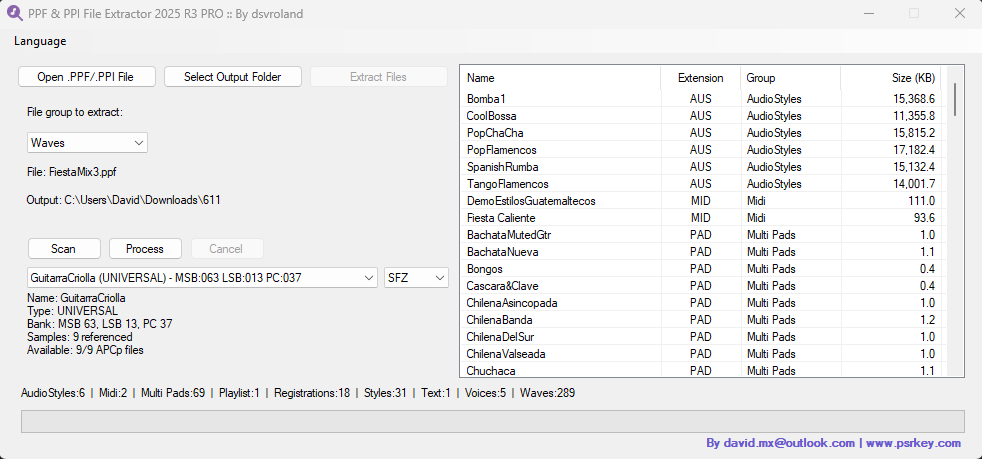
Instant preview of pack contents before extracting. Organized by categories: Voices, Styles, Audio, MIDI, Multi Pads and more.
-
Perfect Audio Conversion (PPF)
PPF to WAV/AIFF conversion from PPF files without quality loss. Supports mono and stereo files.
-
PPI Multi-PACK Processing
Extracts all packs from PPI files automatically. Extract voice configurations, styles, MIDI files and other content (excludes audio waveforms).
-
Smart Path Memory
Automatically remembers your last loaded PPF file path and output folder location, streamlining your workflow for batch processing and repeated conversions.
-
Extended DrumKit Support
Full envelope (ADSR) support for drum kits with automatic detection and optimized output mapping. Perfect percussion reproduction with all dynamic parameters preserved.
-
Global Reverb & Chorus Depth (PPF)
Native support for Yamaha's global Reverb and Chorus Depth parameters embedded in PPF files. SF2 output faithfully reproduces the original effects configuration for accurate sound reproduction.
-
Batch SF2 Export
Process and export multiple SF2 soundfonts in a single operation. Streamlines large-scale conversion workflows, saving time when working with extensive expansion pack libraries.
-
Sample Optimization (WAV & SF2)
Optimize Samples removes the unused audio after the loop point and trims the leading silence, repositioning the loop points automatically. Available for WAV and SF2 output, with a summary showing exactly how much space was saved.
-
Octave Control
Move every voice one octave up or down in a single step, or set the octave of individual voices - ideal when your SF2 player or target device expects the sounds in a different octave.
-
Voice List & Cover Image Export
Export the voice list in three formats - IDL Midisoft, Cakewalk INS and Cubase patch script - from both PPF and PPI files, and save the cover image embedded in a PPF file.
-
Multilingual Interface (8 Languages)
Available in English, Simplified Chinese, Arabic, Italian, Portuguese (Brazil), Indonesian, Hebrew (right-to-left) and German. The Language menu is alphabetical and your choice is remembered the next time you open the app.
Use Cases
- Recover Your Samples: Extract waveforms from your PPF files with complete metadata including loop points, root notes, and key limits preserved
- Cross-Brand Compatibility: Convert directly to SF2 format to use your Yamaha sounds on other brands like Medeli, Korg, Roland, and any SF2-compatible device or software
- Ready-to-Use Distribution: Generate professional SF2 soundfonts ready for immediate use in DAWs, hardware samplers, and virtual instruments without additional conversion steps
- Professional Services: Use as a professional tool to offer conversion services to clients who need format transformations
- Sound Design: Extract individual layers and samples to process with external plugins and create custom instruments
- Archive & Preservation: Create backups of your expansion packs in universal formats for long-term preservation
Supported Content Types
From PPF files (user-created): Complete audio extraction including waveforms, voices, styles with full audio samples.
From PPI files: Voice configurations (VCE), Styles, MIDI files, Multi Pads, Registrations, Playlists, and other non-waveform content.
What's New in 2026 R5
- Four New Languages: Portuguese (Brazil), Indonesian, Hebrew (right-to-left) and German - 8 in total, in an alphabetical Language menu that remembers your choice
- Optimize Samples: trim after loop plus the new trim leading silence, with automatic loop point repositioning and a space-saved summary (WAV / SF2)
- Octave: move every voice one octave up or down, or set the octave per individual voice
- Export Voice List: IDL Midisoft, Cakewalk INS and Cubase patch script, from PPF and PPI files
- Export Image: save the cover image embedded in a PPF file
- New File and Help menus, including an About window and a Get Started guide
PPF to SF2 — Frequently Asked Questions
How do I convert PPF to SF2?
- Open the pack — use File ▸ Open .PPF/.PPI File (or the Open File button) and pick your .ppf.
- Load the voices — choose the Waves group, then click Scan Voices to list the instruments in the pack.
- Set the output — choose SF2 as the output format and pick an output folder.
- Process — select a voice and click Process, or click Process All to convert the whole list at once.
For each voice, YExtractor Pro creates a folder with the extracted WAV samples and the matching <Voice name>.sf2, with key ranges, root keys and loop points already mapped.
Does YExtractor Pro work with all PPF files?
Not with every file. Sample (wave) extraction — and therefore SF2 export — works with .ppf packs created from scratch in Yamaha Expansion Manager by a regular user. Factory and locked or protected Yamaha packs are not supported.
- .ppi files contain no extractable waves — you can open one, browse it and export its voice list, but SF2 and sample extraction is for .ppf only.
- Non-sample content is still extractable — choose a group other than Waves (Styles, Registrations, Multi Pads, MIDI, Audio) and click Extract Files.
If a pack cannot be read, nothing is written and the reason is shown on screen.
What Yamaha keyboards are compatible?
Compatibility is defined by the pack file, not the keyboard you own. Any expansion pack built with Yamaha Expansion Manager (.ppf / .ppi) can be opened — the kind used by instruments such as Genos and Genos 2, Tyros 5, the PSR-SX series, the PSR-S models that use PPF packs (not the S650, S750 or S950, which use the different YEP format), and the Electone ELA-1.
You do not need the keyboard connected: YExtractor Pro reads the pack file directly on Windows.
Can I use the SF2 files on other keyboard brands?
Yes. The exported file is a standard SoundFont 2 (.sf2) file, not a Yamaha-specific format, so any device, plugin, app or DAW that reads SF2 can load it — regardless of brand. The same goes for the extracted WAV and AIFF samples.
The one thing SF2 will not do is go back into a Yamaha arranger, which loads expansion packs through Expansion Manager, not SoundFonts. If your target device only accepts plain audio, export WAV or AIFF instead.
How can I reduce the size of the exported SF2 and WAV files?
Use Options ▸ Optimize Samples (both settings are remembered between sessions):
- Trim after loop — removes the audio after the loop end, which a looped sample never plays. Loop points are preserved and stereo samples are protected.
- Trim leading silence — removes the dead space at the start of the sample and shifts the loop points accordingly.
Neither option changes how the instrument sounds. When something is trimmed, the summary shows how many samples were optimized and how much space was saved. You can also use Process on just the voices you need instead of Process All, so unused instruments are never written.
Can I change the octave of the extracted voices?
Yes, from Options ▸ Octave:
- +1 Octave / None / -1 Octave — applies to every voice you extract; useful when the SF2 player or target device expects a different octave. The choice is remembered.
- Per voice — a grid where you can override the octave of individual instruments; voices you do not touch follow the global setting.
Set the octave before clicking Process or Process All. If you already exported a voice, just process it again with the new setting.
What languages is YExtractor Pro available in?
Eight: English, German, Italian, Portuguese (Brazil), Indonesian, Arabic, Hebrew and Simplified Chinese.
Pick yours from the Language menu — the whole interface switches immediately, with no restart, and your choice is kept for next time.
Can I export the voice list of a pack?
Yes. Load a .ppf or .ppi and use Export ▸ Voice List, which offers three formats:
- IDL Midisoft — a tab-separated text file with MSB, LSB, Program Change and voice name.
- INS File — a Cakewalk Instrument Definition (.ins) file.
- Cubase — a Cubase patch-name script (.txt), so the voices appear by name in the Cubase patch selector.
Before saving you can sort the list by MSB/LSB/PC or keep the original order of the pack.
Video Preview
Watch YExtractor Pro in action - see how easy it is to extract and transform your expansion files:
Screenshots
Customer Reviews
Get YExtractor Pro
Direct SF2 conversion with advanced parameters control, wave sample extraction, and professional soundfont generation for user-created PPF files.
1 PC License
Includes 3 activations for hardware changes
Windows 10/11 - 400 KB
Limited to extracting only style files, registrations, MIDI files, etc. It does not extract wave samples.
Download LiteWindows 10/11 - 400 KB
Specifications
- Version Pro 2026 R5
- Output Formats SF2, WAV, AIFF
- Platform Windows 7/10/11
- License Commercial
- Last Update July 2026
- Languages English, Simplified Chinese, Arabic, Italian, Portuguese (BR), Indonesian, Hebrew, German
System Requirements
- OS (Minimum) Windows 7 or higher
- OS (Recommended) Windows 10/11 64-bit
- RAM (Minimum) 4 GB
- RAM (Recommended) 8 GB or more
- .NET Framework 4.7.2 or higher
- Disk Space 500 MB + extraction space